Skip to content
Features
What StarStats does, in detailWhat StarStats doesGo from this…
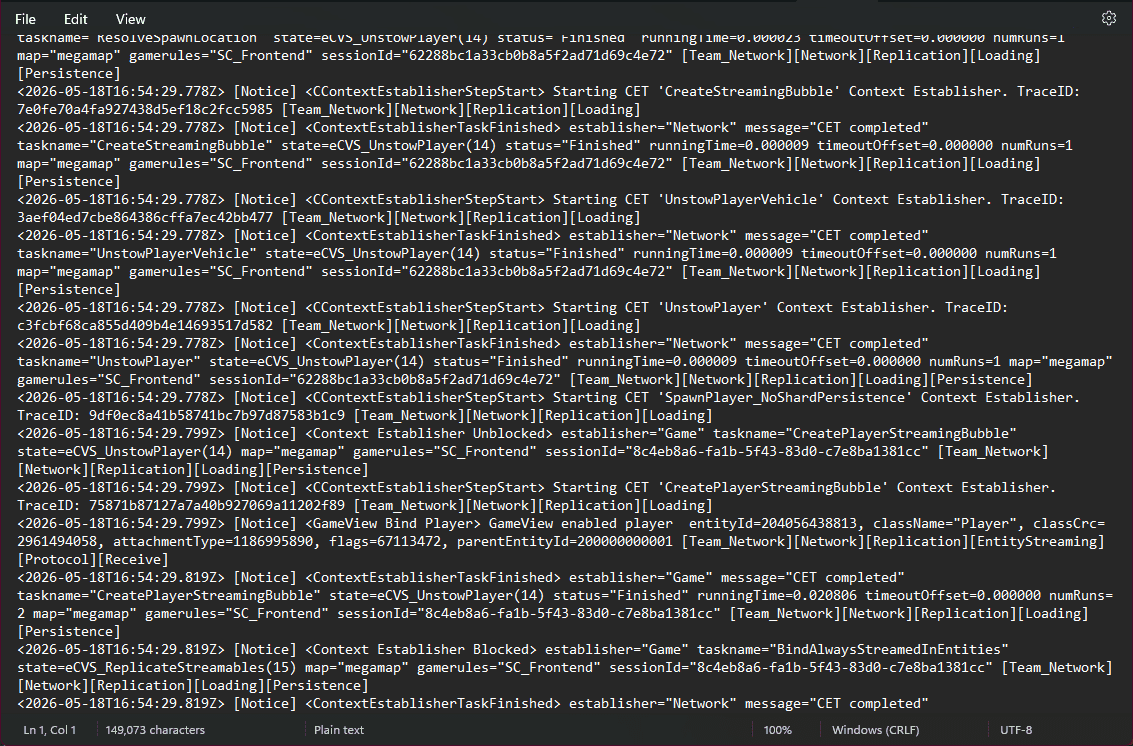
Go from this…
to this.
The game already writes everything you did to a log file. It just doesn't look like much. StarStats reads it locally, parses it, and renders the parts you'd actually want to see.
Your timeline · rendered
- Session startedGame.log opened · LIVE channel
- Spawned into Stantonmegamap · SC_Frontend lobby
- Joined Persistent Universeshard 8c4eb8a6 · player bound
- Streaming bubble readyalways-streamed entities online
4 events · engine noise filtered
Real fragment of Game.log. Every line is something the game wrote about itself. StarStats turns the ones that matter to you into a timeline.
01Data transparency
Reads what the game writes, never anything else.
No injection, no memory hooks, no scraping inside the client. The tray reads the same Game.log Star Citizen ships to disk for everyone, parses the lines that describe what you did, and ignores the rest.
EAC-safe by construction
Plain file reads from your own machine. Nothing touches the game process. Nothing your anti-cheat would object to.
Your events only
Logins, deaths, missions, jumps, hangar refreshes — events the game already attributes to you. Never chat, never other players' positions.
Local-first by default
Everything stays on your PC until you sign in and turn on remote sync. You're in charge of when, what, and how much.
02The dashboard
A cockpit for your own play.
The StarStats dashboard reads like ship instrumentation: dense, legible, diegetic. A configurable grid of live panes — corner-bracketed where the data streams — with every figure in a mono readout and a telemetry rail down the side.
Live panes, earned brackets
The activity heatmap, travel, combat and economy readouts stream in real time — and carry corner brackets to say so. Snapshot panes stay calm. Brackets mean live, never decoration.
Telemetry rail
A persistent strip beside the nav streaming your current location, total events and locations visited — bracketed frames that collapse to a ticker on mobile.
Four themes, one layout
Stanton, Pyro, Terra and Nyx — warm amber, molten coral, clinical teal, and a light violet. Colour changes; the dense instrument structure never does. AA-legible in all four.
Focus lenses & ranges
Filter the whole board to Activity, Travel, Combat, Loadout or Commerce, and retime it from 24 hours to all-time. Drag to rearrange, resize, or hide any pane.
03Knowledge base
Every ship, item and place — named.
Engine identifiers like ORIG_100i are meaningless on their own. A wiki-synced catalogue turns them into real names across the whole app — with hover stats, full Ship Matrix spec sheets, a browseable contract catalogue, and a body-outline view of your loadout.
Named everywhere
Ships, weapons, items and locations resolve to their real names on every surface — timeline, sharing, org views — each with a hover card carrying the key stats.
Ship Matrix specs
Open any vehicle for the official RSI Ship Matrix sheet — dimensions, speed, crew, cargo — plus a peer-relative visual comparison against a cohort you pick.
Loadout paperdoll
The gear the game last restored, drawn on a body outline: armour by slot, weapons and carried kit grouped, named, and linked back to the catalogue.
Locations, classified
Systems, planets, moons, cities, stations and jump points sorted into an eight-tier hierarchy, so "you are here" always resolves to something real.
04Cloud sync
Sync your settings across devices — when you choose.
Pair the tray to your account once, then opt in to cloud sync per device. Your theme, sync cadence, and tray preferences ride along to every uplink you turn on. Off by default. You revoke any uplink remotely from the web.
Per-device opt-in
Cloud sync is off by default on every device. Flip the toggle on the tray you actually want to sync. The others stay strictly local.
Connected Uplinks page
See every paired tray under one roof on /devices. Toggle sync on or off per uplink from the web — the device picks it up on its next tick.
Web is always your account view
When you sign in on a new browser, your theme follows from your account automatically. Clearing site data doesn’t lose your settings.
Last-write-wins
Change a setting on the tray, change it on the web — most recent write wins. No merge dialogs, no surprises. Each device only writes what it owns.
05Records & insights
Surface what actually stood out.
Your timeline is the raw material — the dashboard pulls out the moments worth telling someone about. The records widget highlights your deadliest single session and links straight back to the events behind it.
Deadliest session
The play period with the most kills and deaths, surfaced on your dashboard with a click-through to the full session timeline.
Activity heatmap
Per-day grid going back as far as your manifest. Pick a range from 30 days to a full year; one cell per day, one click to drill in.
Top event types
Sorted distribution of what you actually did. Filter the stream by type from the same chart — no separate query language to learn.
In-game manifest
Recent stops chain, latest pledge snapshot, RSI org membership. Everything ties back to a verifiable event in the log.
06Sharing, orgs & StarPlatform
Show the parts you choose. Hide the rest.
Profile-level visibility (public, RSI org, named handles, fully private) plus per-event scopes on top. Allow or deny individual event types per share. Verify a handle is yours by pasting a short code into your RSI bio for a minute.
Per-event visibility
Allow- or deny-list specific event types on each share. Show your deaths but not your hangar. Show your logins to your org but nothing else.
Named-handle grants
Grant access to a specific RSI handle with an optional expiry. They see what you share; they never see what they were never granted.
Orgs & StarPlatform
RSI org owners get a shared dashboard with ReBAC roles. Run a whole group live on the self-hosted StarPlatform companion — presence, roster and an ops board, opt-in on both ends.
Hash-chained audit
Every share action (created, viewed, revoked, reported, visibility-changed, device-sync toggled) lands in an append-only audit log you can inspect.
07Export & ownership
Your numbers stay your file.
The whole manifest is yours. Download it, take it with you, delete it whenever. Nothing locks you in. Open formats, plain rows, no proprietary blobs.
Full manifest download
Account record, devices, preferences, profile and hangar snapshots, shares, and every event. One click in Settings, streamed straight from the server.
Open formats
NDJSON for the timeline, CSV for the event table, ZIP bundle for everything. Nothing you can’t open in a text editor.
Delete on request
Account deletion clears everything except the audit-chain tombstone that records the deletion itself. No silent retention.
Source-available
Read the code on GitHub. If something looks off, raise an issue — or build it differently yourself.
StarstatsProjection heldCalibration